
Model Context Protocol (MCP) is a small, boring contract that lets an LLM call your tools instead of trying to be your tools. For a DBA, that means the chat model never holds your DB password, never writes raw SQL into production, and never executes an Ansible playbook on its own. It asks an MCP server to do a named, validated operation. The server enforces the rules. The model just talks.
I have been building a chat-driven Oracle and Ansible console for our DBA team over the last several months. The single decision that made it safe to put in front of real engineers was choosing MCP as the boundary between the model and the systems. This post explains MCP the way I wish someone had explained it to me on day one, with no marketing.
What problem does MCP actually solve
If you give an LLM raw access to a database, two bad things happen. First, the model writes SQL that looks correct and runs against the wrong environment. Second, your audit trail becomes a chat transcript, which is not an audit trail. The same is true for Ansible. A model that can shell out to a host can also restart the wrong listener at the wrong time of day.
MCP fixes this by inverting the relationship. The model does not get tools. The model gets a list of named tools that an MCP server is willing to expose. Each tool has a typed schema, a description, and validation. The model can call run_query(name="blocking_sessions", env="TST"), but it cannot type free SQL into a session. The MCP server decides what is allowed.
This is the same pattern as a database stored procedure. The application does not write SQL. It calls pkg_orders.create_order(...) and the package controls what runs. MCP is that pattern, applied to the chat layer.
The mental model in one diagram
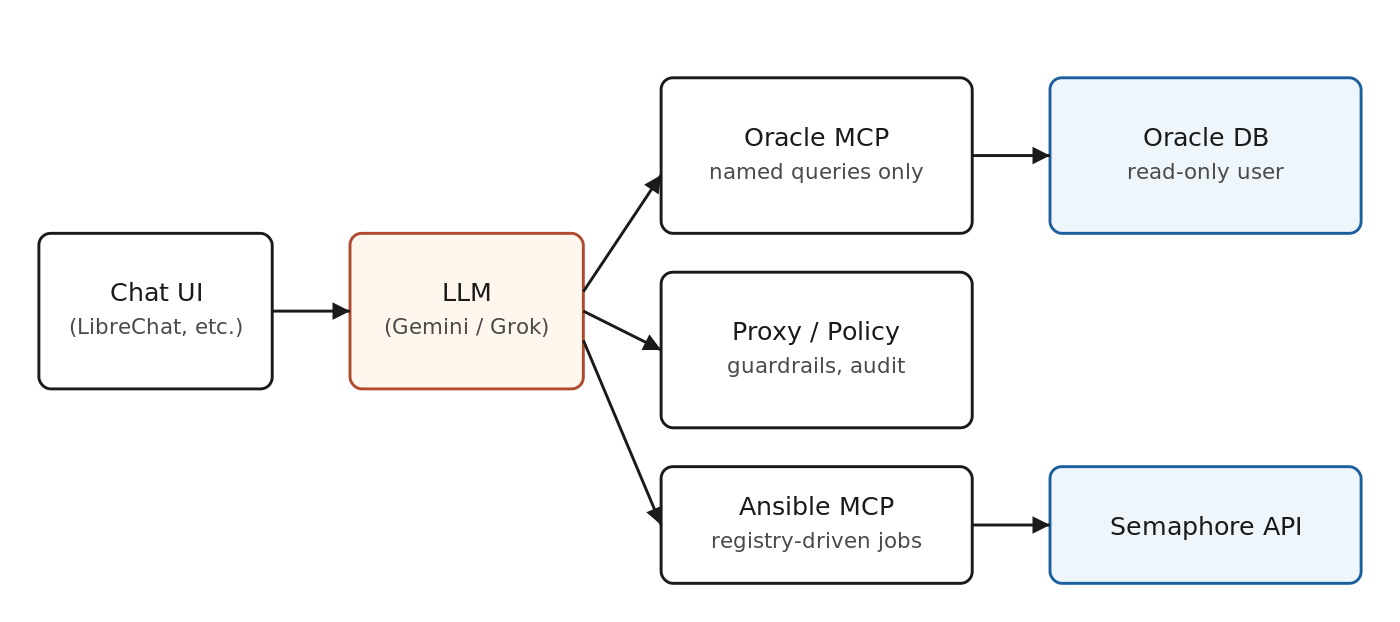
Chat goes to the LLM. The LLM only ever talks to MCP servers. MCP servers hold the credentials and the rules.
The three things an MCP server gives you
1. A list of allowed tools
Each tool has a name, a JSON schema for its arguments, and a short description the model uses to decide when to call it. In our Oracle MCP, examples include list_named_queries, run_named_query, exec_sql (read-only, allowlist-checked), and describe_table. The model never sees connection strings. It sees a menu.
2. Validation before execution
This is where most home-grown chat-to-DB attempts fail. The MCP server is the right place to enforce things like:
- Environment must resolve to a real inventory group, not a typo.
- Only
SELECTis allowed for ad-hoc SQL, and only against a curated schema. - Long-running queries get a hard timeout and a row cap.
- Production environments require an extra approval flag the model cannot fabricate.
If validation fails, the server returns a structured error. The model sees the error, explains it to the user, and tries something else. The bad call never reaches the database.
3. A real audit log
Every tool call lands in a JSON line file with the user identity, the model name, the tool, the arguments, the resolved environment, the row count, the duration, and the success flag. This is your audit trail. The chat transcript is just a UX artifact. The audit log is the truth.
What a tool definition actually looks like
{
  "name": "run_named_query",
  "description": "Run a curated, named read-only query against an Oracle environment.",
  "inputSchema": {
    "type": "object",
    "properties": {
      "name": {"type": "string", "description": "Query name from the catalog"},
      "env":  {"type": "string", "description": "Logical env, e.g. TST"},
      "params": {"type": "object", "additionalProperties": true}
    },
    "required": ["name", "env"]
  }
}
That is it. The model reads the description, picks the tool, fills in the arguments, and the server takes over. No prompt engineering trick replaces this contract.
Why this matters more for DBAs than for app developers
App developers can sandbox an LLM with a temporary container and let it loose. A DBA cannot. The blast radius is too large and the systems are too old. An accidental ALTER SYSTEM on a shared environment ruins someone’s afternoon. A wrong shutdown immediate on the wrong host costs a weekend.
MCP gives you a clean place to put the safety. You stop trying to convince a probabilistic model to behave and start enforcing rules in deterministic code where they belong. The model becomes the natural language layer. The MCP server becomes the policy layer. The two stay separate.
What MCP does not do
MCP does not give you good queries. You still need to curate the named queries, write the playbooks, and decide what is safe to expose. MCP also does not protect you from a bad model. If the model picks the wrong tool, the tool runs. Your defense is the validation inside the tool, not the model’s judgment.
It also does not solve identity. The MCP server runs as some service account. Whether the call ends up auditable to a real human depends on how the chat front end passes user identity to the server. Plan that path early or you end up with a great audit log that says service_account for every row.
Where to start if you want to try this
Pick one read-only use case. Something like a daily blocking-session check or a tablespace summary. Build a small MCP server with three tools: list_queries, run_query, and describe_query. Wire it to LibreChat or any MCP-aware client. Show it to two DBAs. You will learn more in a week than from a month of architecture diagrams.
The goal is not to replace the DBA. The goal is to remove the twenty minutes of context-gathering at the start of every incident. MCP is the boring infrastructure that makes that possible without scaring your security team.
Further reading
- Anthropic, Model Context Protocol specification.
- Oracle, python-oracledb documentation, thick mode for full feature support.
- LibreChat docs on MCP server integration.

- From Chat to Autonomous Agents: A Maturity Model for DBA AIOps - April 27, 2026
- Query Catalog Pattern for Natural Language to SQL: Frontmatter-Driven Routing - March 22, 2026
- Safe Ansible Automation for AI Chat: A Guardrail Framework - February 3, 2026