
Most RAG projects fail because someone dumps a folder of PDFs into a vector store and hopes for magic. For database operations, the value is in six narrow, curated collections: SOPs, query catalog, schema notes, incident summaries, environment inventory, and guardrail rules. Index those well and a smaller model becomes useful. Skip them and even a frontier model will hallucinate confidently.
I run a chat console for our DBA team that answers questions like “who is blocking who in DEV” or “what is the approved query for top waits”. Early on I made the same mistake everyone makes. I indexed everything I could find. Confluence pages, old runbooks, vendor PDFs, scattered Word docs. The bot got worse with every document I added. Useful answers got buried under noise.
The fix was uncomfortable. I deleted most of it and started over with a much smaller, much more deliberate set of collections. The bot went from frustrating to actually useful in a week. This post is what I would tell my past self.
Stop thinking of RAG as learning
This is the mental shift that fixes most RAG problems. Retrieval-augmented generation is not training. The model is not learning anything. RAG is runtime lookup, the same way a good engineer keeps a runbook open in another tab while they work.
That reframing changes what you index. You stop trying to teach the model your environment and start asking what the model needs to look up at the moment a question arrives. The answer is almost always a small, well-organized set of curated documents, not a sprawling document lake.
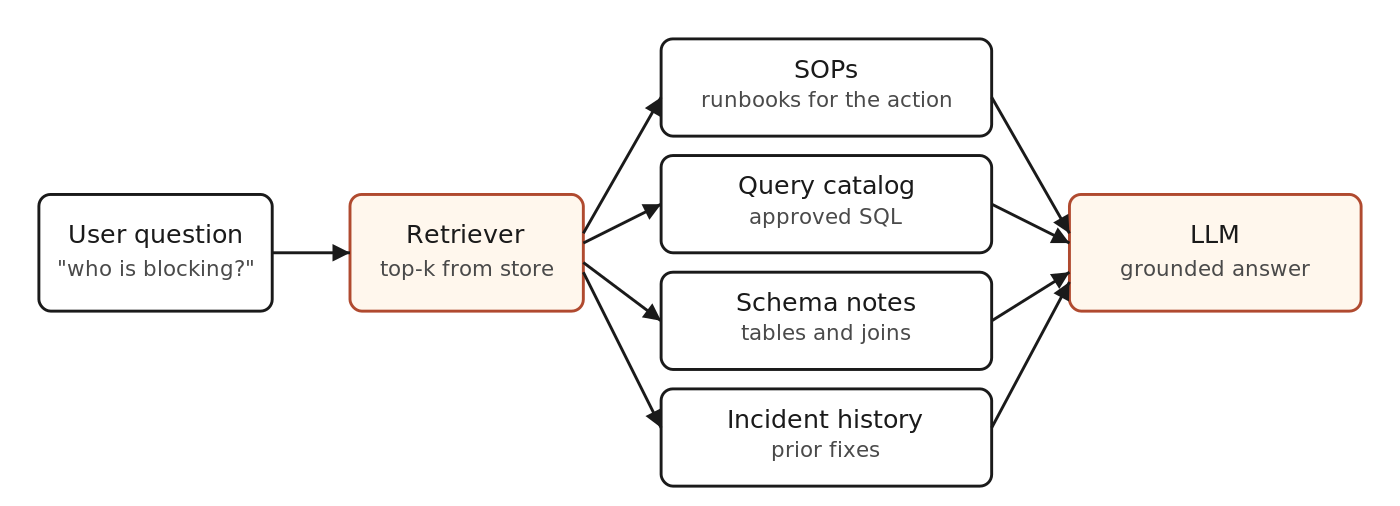
RAG pulls a few high-signal chunks from curated collections. The LLM only sees those, plus the question.
The six collections that actually pay off
1. SOPs and runbooks
Start here. SOPs are the highest signal content you have. They describe stable procedures. They are written by humans who know what they are doing. Examples include database bounce steps, listener restart procedures, OACORE recovery, EBS concurrent manager troubleshooting, and standard health-check sequences.
Index each runbook as one document, or break it into named sections if it is long. Always include the section header in the chunk text so the retrieved snippet stands on its own. A naked paragraph that starts with “step 4 is” tells the model nothing.
2. Query catalog
This is the highest leverage collection for a database ops bot. Each entry is a curated, read-only SQL query plus the explanation around it. Do not store raw SQL alone. Store the query name, the purpose, the environment scope, the required inputs, the meaning of the output, the limitations, and any escalation note.
---
title: "Currently Blocking Sessions"
query_name: "blocking_sessions"
application: "Oracle DB"
environments: ["DEV", "TST", "STAGE"]
execution_mode: parameterized
required_params: []
intent_family: session_mgmt
aliases: ["who is blocking", "blocked sessions", "lock holders"]
---
SELECT s.sid, s.serial#, s.username, s.osuser, s.machine,
       s.blocking_session, b.username AS blocker_user
FROM   v$session s
LEFT JOIN v$session b ON b.sid = s.blocking_session
WHERE  s.blocking_session IS NOT NULL
ORDER  BY s.blocking_session;
The frontmatter is what makes retrieval work. Aliases catch the natural language phrasing. The intent family lets you narrow the search before you ever embed anything. The environment list lets the model refuse a bad target. I will dedicate a separate post to the query catalog pattern because it deserves the depth.
3. Schema and data dictionary notes
Do not embed the entire data dictionary. That is lazy and noisy. Embed the parts a human DBA actually keeps in their head: the important tables, important views, the common joins, what each table is for, what to avoid, and which objects are heavy. For Oracle EBS that means things like FND_CONCURRENT_REQUESTS, FND_CONCURRENT_QUEUES, V$SESSION, and DBA_HIST_ACTIVE_SESS_HISTORY.
One short note per table. Include a one-line “what this is for”, three or four representative columns, the natural join partners, and a warning if the table is huge or expensive to scan.
4. Incident summaries
This is the collection most teams skip. It is also the one with the highest ROI after SOPs. For each meaningful incident, store a short structured note with the symptoms, the environment, the impact, the root cause, the fix, and any prevention follow-up. When a similar issue happens again the bot can pull the prior fix and save someone forty minutes of pattern matching.
Keep these tight. One page is plenty. The bot is not writing a postmortem. It is reminding a human what worked last time.
5. Environment inventory and metadata
Most ops bots fall over because they do not know the difference between two environments that look almost identical (a DEV1 and a DEV2 with subtly different patch levels and connect strings). Index a small set of environment notes that describe each environment in plain English. Names, purpose, hosts, service names, the apps DBA on call, the DR pair, the patch level, the maintenance window. The bot needs this to answer “is the change window open in STG right now” without guessing.
6. Guardrails and policy notes
This is the one that prevents embarrassment. Index the rules the bot is supposed to follow. What it must not do in production. Which environments are read-only. Which playbooks require a force flag. Who can approve what. The retriever pulls these into context for any sensitive question, and the model uses them to refuse politely rather than improvise.
The chunking rule that matters
Chunk at the boundary of meaning, not at a fixed token count. A SOP step is a chunk. A query catalog entry is a chunk. A table note is a chunk. An incident summary is a chunk. Fixed-size chunking will split a query in half and embed two useless halves. Boundary-aware chunking gives the retriever exactly what the model needs to ground an answer.
Yes, this means you write a small custom indexer per collection. Yes, it is worth the afternoon.
Retrieval that respects intent
If your bot has any structure, the retriever should narrow before it embeds. A question tagged as session_mgmt should pull from the query catalog and the SOPs first. A question about an environment difference should pull from environment inventory. Generic top-k cosine search across all collections is the dumbest thing you can do once you have intent labels.
Two cheap retrieval tactics that punch above their weight:
- Alias matching first, embedding second. If the user’s phrase matches an alias in the query catalog frontmatter, return that entry directly and skip semantic search. Aliases are a precision boost the embedding model cannot beat.
- Filter by environment. If the user mentions
STG, drop everything tagged forDEVonly. The model has less garbage to wade through and gets the answer right faster.
What a weak model can do once you do this
The reason this matters in practice is cost and latency. A small, fast model running on cheap inference can be very useful when the retrieved context is high signal. It can be useless when the context is a wall of irrelevant text. Doing the curation work means you can run a Gemini Flash, a Grok Fast, or a similar tier and still get good answers. You earn the right to skip the expensive frontier model on most queries.
What to leave out
Resist these temptations. Vendor PDFs unless they are short and authoritative. Old Confluence pages no one has touched in two years. Raw alert log dumps. Email threads. Generic Oracle blog posts that someone bookmarked once. They all hurt retrieval quality and cost you tokens at inference.
If a document does not answer a real question your team actually asks, it does not belong in your vector store. That is the only filter that matters.
A staged plan you can run this month
- Pick five recurring questions your team gets every week. Write a one-page answer to each. That is the seed for the SOP collection.
- Open your saved SQL folder. Pick the twenty queries you actually use. Add the frontmatter. That is your query catalog v1.
- List your environments in a single Markdown file. One paragraph each. That is your environment inventory.
- Write three short incident summaries from this quarter. That is the seed for the incident collection.
- Stand up a basic retriever. Connect it to a chat front end. Try it for a week before you add anything else.
The point is not to build the perfect system on day one. The point is to feel the difference between good retrieval and bad retrieval on real questions. Once you feel it, you stop being tempted to dump random PDFs into a vector store and call it AI.
Further reading
- LibreChat RAG API documentation and pgvector storage layout.
- Oracle, AI Vector Search in Oracle Database 23ai.
- The original RAG paper, Lewis et al. 2020, for the boring fundamentals.

- From Chat to Autonomous Agents: A Maturity Model for DBA AIOps - April 27, 2026
- Query Catalog Pattern for Natural Language to SQL: Frontmatter-Driven Routing - March 22, 2026
- Safe Ansible Automation for AI Chat: A Guardrail Framework - February 3, 2026