
Don’t ask an LLM to write SQL against your production schema. Curate a small set of named, parameterized queries in Markdown files with structured frontmatter, then route natural language to the right one. Aliases catch phrasing, intent families narrow the search, environment scoping prevents cross-env mistakes, and multi-section queries give you tabbed Excel exports for free. The pattern scales from twenty queries to several hundred without losing precision.
The dream of “just ask the database in English” sounds great until the model writes a join across the wrong dictionary view and locks up your test database for ten minutes. The realistic version is narrower and far more useful. Curate the queries your team actually runs, attach enough metadata to make them findable, and let the model pick the right one. The model never writes SQL. It chooses from a menu.
This is the catalog pattern I use in an Oracle ops chat console. Several months in, around 120 named queries cover roughly 80 percent of the questions DBAs ask the system. The remaining 20 percent get a tightly bounded ad-hoc SELECT path with strict guardrails. The catalog does most of the work.
What a catalog entry looks like
One Markdown file per query. The top is YAML frontmatter the system parses. The body is the SQL itself, optionally with multiple sections divided by a horizontal rule.
---
title: "Top Wait Events from ASH (last hour)"
query_name: "ash_top_waits_last_hour"
application: "Oracle DB"
environments: ["DEV", "TST", "STAGE"]
execution_mode: parameterized
required_params: []
param_defaults: {"minutes": 60}
intent_family: performance
aliases:
  - "top waits"
  - "what is the database waiting on"
  - "ash wait analysis"
  - "biggest waits last hour"
  - "wait classes"
---

SELECT wait_class,
       event,
       COUNT(*) AS sample_count,
       ROUND(COUNT(*) * 100 / SUM(COUNT(*)) OVER (), 2) AS pct_of_total
FROM   v$active_session_history
WHERE  sample_time > SYSDATE - (:minutes / 1440)
AND    session_state = 'WAITING'
GROUP BY wait_class, event
ORDER BY sample_count DESC
FETCH FIRST 25 ROWS ONLY;

---

SELECT wait_class,
       COUNT(*) AS sample_count
FROM   v$active_session_history
WHERE  sample_time > SYSDATE - (:minutes / 1440)
AND    session_state = 'WAITING'
GROUP BY wait_class
ORDER BY sample_count DESC;
That single file gives you a query, a parameter contract, an environment scope, an intent label for routing, and a list of natural-language phrases that should map to it. The body has two SQL sections divided by ---. The runtime treats the second section as a separate result set, which becomes a second sheet when the user asks for an Excel export.
Frontmatter fields and what they earn you
| Field | Why it exists |
|---|---|
title |
Human-readable label shown in the chat reply and the Excel header. |
query_name |
Stable snake_case identifier used in audit logs and tool calls. |
application |
Coarse filter so an apps-tier query is not offered for an Oracle-DB-only question, and vice versa. |
environments |
Allowlist of logical envs the query can run against. Anything else is refused at the proxy. |
execution_mode |
direct for static SQL, parameterized for bind variables, reference_only for SQL kept in the catalog for reading but never executed. |
required_params |
Parameters the user must provide. The proxy refuses to run if any are missing. |
param_defaults |
Defaults for optional parameters. Reduces back-and-forth in chat. |
intent_family |
One of session_mgmt, performance, storage, cm_health, etc. Used by the router to narrow before semantic search. |
aliases |
Natural-language phrases that should map to this query. Highest precision retrieval signal you have. |
How a question becomes a query call
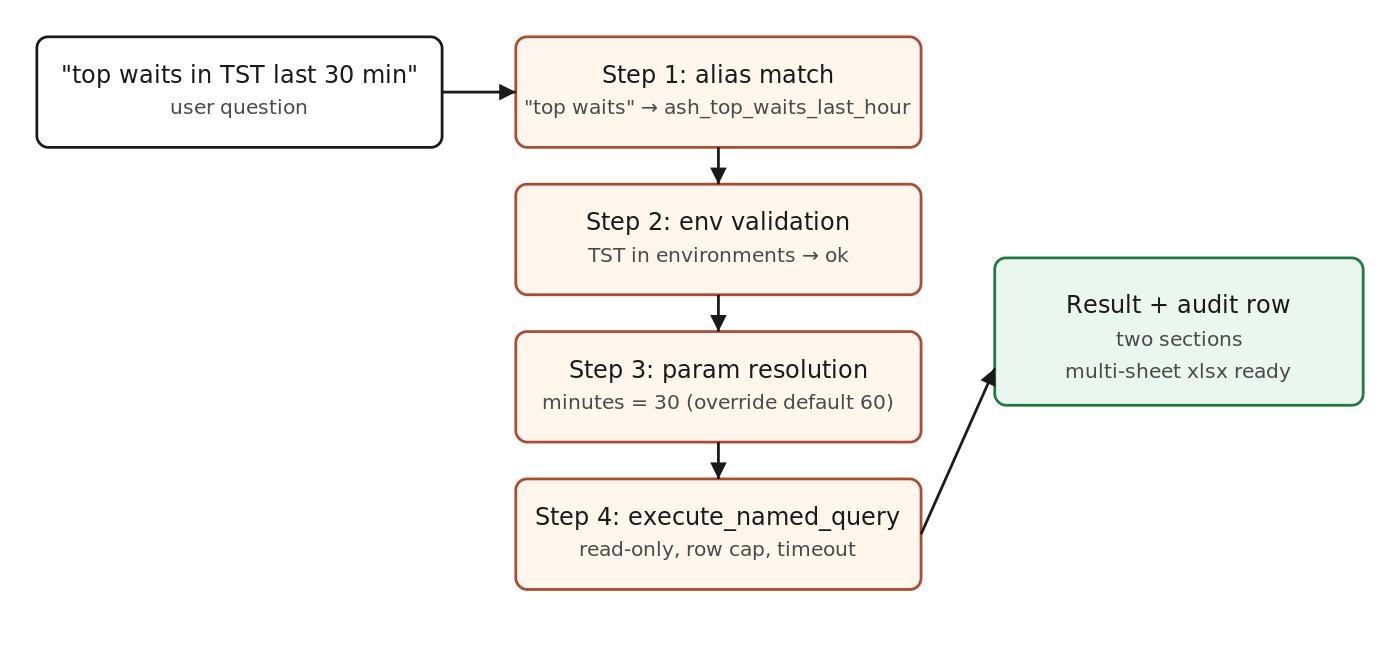
The model never writes SQL. It picks a query, fills params, and the runtime does the rest.
The retrieval order that gives you precision
Vector search is the slow, last-resort step. Cheaper steps come first.
- Exact alias match. Normalize the user phrase, scan the alias index, return any match directly. This handles maybe 50 percent of well-trained users without ever calling the LLM.
- Intent family narrow. If the message clearly belongs to one family (“blocking”, “wait”, “tablespace”), restrict candidates to that family before any semantic search.
- Environment narrow. Drop catalog entries whose
environmentslist does not include the requested env. - Application narrow. Drop entries whose
applicationdoes not match the conversational context. - Semantic search on what is left. Embed the title plus aliases plus a one-line summary. Top three.
- LLM picks one of the three. Or asks the user to clarify if none fit well.
That stack converts a 120-entry catalog into roughly five candidates by the time the LLM is involved. Picking the right one becomes a small, easy decision.
Parameter contracts the model can follow
Bind variables only. Never string-substitute user input. The catalog entry declares required_params and param_defaults. The proxy validates and supplies defaults before the SQL ever sees a value.
required_params: ['concurrent_program_short_name']
param_defaults: {"days": 7}
If the user does not provide concurrent_program_short_name, the model returns a question to the user instead of guessing. If the user does not specify days, the runtime fills in 7. The model has no way to inject anything except declared parameter values, and those go through the database driver as binds.
Environment scoping that prevents cross-env mistakes
The environments field is checked twice. First when the model is choosing a query, the catalog entries that do not list the target env are filtered out, so the model does not even see them. Second when the runtime resolves the connection, if the requested env is not in the entry’s environments list, the request is refused even if the model somehow asked for it. Belt and suspenders again.
Logical aliases like DEV can fan out to multiple physical envs (DEV1, DEV2, DEV3) at runtime when a team has more than one development database. The catalog entry only needs to list the logical names. Multi-env runs become a fan-out the runtime handles, not something each catalog entry has to know about.
The multi-section trick that is worth its weight in gold
Many real diagnostic questions need two or three result sets to make sense. “What is the database waiting on” is best answered with both the wait class breakdown and the top events inside that class. Forcing the user to ask twice is bad UX.
The catalog supports multi-section SQL by separating sections with --- on its own line in the body. The runtime executes each section, attaches a section title (taken from the first comment line of each section if present), and returns them as an array. The chat reply renders each as a small table. The Excel export turns each into a separate sheet, named after the section. One catalog entry, one chat call, three sheets.
The reference_only mode for SQL you do not want executed
Some queries you want findable but not runnable. A long-running ASH report you only run in a maintenance window. A query that needs operator judgment to interpret. Mark them execution_mode: reference_only. The catalog still indexes them, the chat can still describe them and show the SQL, but the execute path refuses. This is the right home for “here is how we do it, but a human runs this one”.
Maintenance: the catalog is a living artifact
This pattern works only if the catalog is curated. Three habits keep it healthy.
- Add an entry every time someone asks the same question twice. The bot did not have a good answer the second time? That is your signal. Add the catalog entry before the third time.
- Review aliases monthly. Pull the audit log. Find the questions that fell back to ad-hoc SQL or returned “I do not know”. Half of those are missing aliases on entries that already exist.
- Retire entries deliberately. A query that has not been called in six months is suspect. Mark it
reference_only, delete it, or move it to an archive folder. Stale entries hurt retrieval more than missing ones.
What this pattern does not solve
It does not write SQL for novel questions. The honest answer to “I have never seen this question before” is “ask a DBA, or write the query yourself and we will catalog it”. Trying to make the model freelance SQL is the trap. You will spend more time apologizing for bad results than building useful entries.
It also does not replace good DBA judgment about what data is sensitive. Catalog entries that pull PII or financial data still need access controls upstream. The catalog is a routing layer, not an authorization layer.
A starter template you can copy
---
title: ""
query_name: ""
application: "Oracle DB"
environments: []
execution_mode: parameterized
required_params: []
param_defaults: {}
intent_family: ""
aliases: []
---

-- Section 1: short comment shown as the section title
SELECT ...
FROM   ...
WHERE  ...
;
Start with five entries. Wire them through your chat layer. Use the system for a week. You will know exactly what fields you actually need and which ones to drop. The version in this post is what survived several rounds of that exercise.
Further reading
- Oracle, SQL Language Reference for bind variable behavior.
- YAML frontmatter conventions as used in static site generators (Jekyll, Hugo).
- OWASP cheat sheet on SQL injection prevention, with emphasis on parameterized queries.

- From Chat to Autonomous Agents: A Maturity Model for DBA AIOps - April 27, 2026
- Query Catalog Pattern for Natural Language to SQL: Frontmatter-Driven Routing - March 22, 2026
- Safe Ansible Automation for AI Chat: A Guardrail Framework - February 3, 2026